 +49 211-97278150
 info@gigacopper.net




Dear customer. After many questions, we have compiled some useful information here
What are advantages of our G.hn devices over powerline and Wi-Fi repeaters, and how can they be used to improve Wi-Fi coverage in the home?
Since its inception in 1997, Wi-Fi technology has developed significantly: whilst the first generation could barely transmit 1 Mbit, bandwidths in the gigabit range are now possible. Modern mesh systems offer simple network configuration as well as automatic switching of end devices between distributed Wi-Fi access points (repeaters) within the network.
Despite all these improvements, however, the general problem with Wi-Fi technology remains: the transmission power of the devices is relatively low and regulated by law, which limits the range of the radio signal. Even a solid wall or a reinforced concrete ceiling can make Wi-Fi reception impossible. Mesh systems do little to change this if the connection between the access points is via Wi-Fi – in this case, they function like conventional repeaters. In apartment blocks, there is an additional problem – many networks are concentrated in a ‘confined space’, overlapping in the Wi-Fifrequencies they use and interfering with one another.
That is why the principle still applies today: fast and stable connectivity requires a wired network! For optimal Wi-Fi coverage, the mesh repeaters must be connected to the network via LAN cables; wireless connections between the base stations should be the absolute exception!
An obvious solution for setting up a wired network is to use powerline modems, which utilise existing electrical wiring for data transmission. Using the devices is incredibly simple: you plug them into the sockets, press a button to synchronise them, and the network is up and running straight away. What sounds good in theory fails in practice due to laws of physics: the power lines are neither shielded nor twisted, so they do not meet the requirements for a proper data cable. Furthermore, the cables of different circuits in the house are not connected together. Everyone knows the reality of powerline networking: it only achieves a fraction of the speed advertised by the manufacturer, and the network often suffers from high latency and dropouts.
Setting up a home network with our devices is just as simple: you just need to connect them using the existing coaxial or telephone cables in your home, and the network is ready to use straight away. However, the quality of this connection is far superior! Unlike power cables, coaxial and telephone cables are designed for fast and stable data transmission: coaxial cables are very well shielded, telephone cables are twisted, and some types have basic shielding. That is why they have always been used successfully in telecommunications and TV transmission.
Our G.hn modems and switches utilise the beneficial properties of telephone and coaxial cables and, with the help of the G.hn standard, transform them into a fast wired network. A major advantage for Wi-Fi coverage: the Wi-Fi repeaters are connected to the network via LAN!
Telephone or coax?
The nominal performance of telephone and coaxial cables is roughly the same. When setting up a network in a private house, coaxial and telephone cables deliver similar performance.
When networking larger buildings (hotels, halls of residence, etc.), we recommend using coaxial or 4-core telephone cables.
If necessary, coaxial and telephone solutions can be used in parallel.
Coax and telephone connection range
Up to 35dB attenuation, a net bandwidth of approx. 1500MBit/s is achieved with telephone and coaxial cables, at 50dB – approx. 1GBit/s, at 75dB – still 100MBit/s.
Various cable types with different attenuation values exist on the market.
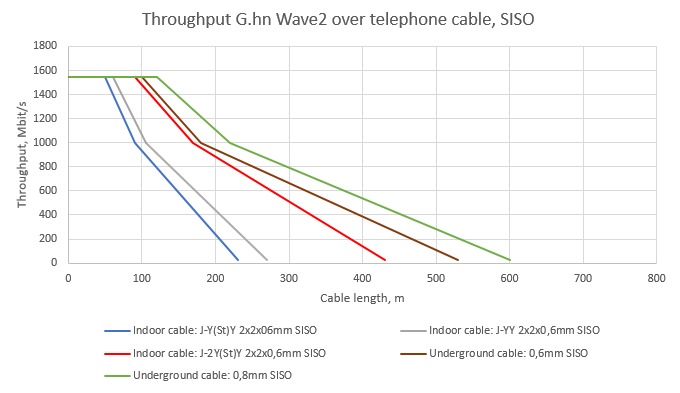
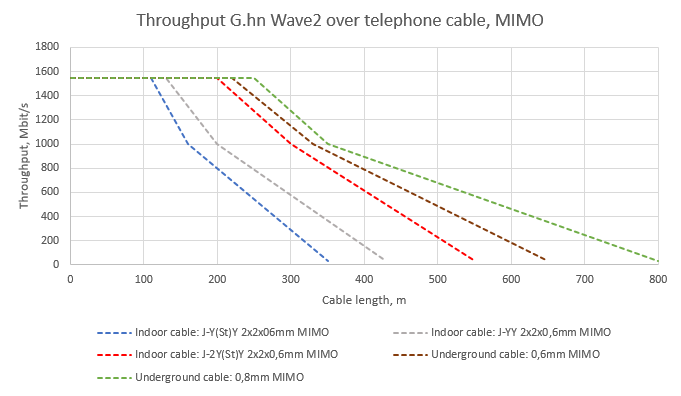
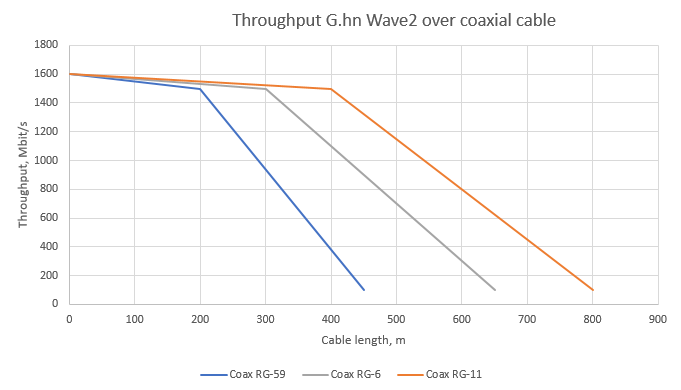
The following graphs show the achievable bandwidth in practice for common telephone cable types in SISO and MIMO mode (2-/4-wire) as well as for typical coaxial cables:
- Telephone cables for indoor cabling: J-Y(St)Y, J-YY and J-2Y(St)Y. In common parlance they are also called electrician’s / post / ISDN cables.
- Telephone cable for outdoor cabling: A-2Y(L)2Y and A-02Y(L)2Y underground cable
- Coaxial cable for indoor cabling: RG-59, RG-6 and RG-11 with attenuation at 200MHz of 17dB, 12dB and 8dB respectively
Do you also offer G.hn modems with integrated WiFi function for home networking?
We no longer develop or offer devices with integrated WiFi. The reason is simple – the state of WiFi networking today is a mesh system. This is technically the best (and only right) solution, because with a WiFi mesh system the entire configuration takes place centrally in one place and the end devices can switch between the access points (repeaters) automatically and without data interruption during operation.
With a WiFi mesh system, all components must be from the same manufacturer, as there is currently no common mesh standard.
Our recommendation is therefore to combine our modems with mesh-capable repeaters of your choice, which you connect to our modems via LAN cable.
Another positive effect is the possibility of continuing to use existing mesh repeaters. This saves costs and avoids electrical waste.
Why does iperf for Windows show very low measurement results?
We are often asked the following question: “According to the web interface, the modems achieve a bandwidth of approx. 1800MBit/s. I can distribute my gigabit connection in the house at full power without any problems, and also transfer files in the local network at gigabit speed. However, with iperf for Windows I only measure 100-300MBit/s. What is the problem?”
It is due to the age-old error in the Windows version of iperf, which is in the obsolete cygwin1.dll file.
If iperf detects a somewhat longer latency during the measurement than is usual with classic Ethernet, the size of the Windows receive buffer (TCPWindowSize) is often not scaled correctly. The buffer is selected too small and the bandwidth of the data connection cannot be fully utilised.
To achieve correct results with the Windows version of iperf, there are several solutions:
- When starting iperf, set the TCPWindowSize manually with the parameter -w (-w 1024K).
- Update the old cygwin1.dll. The current version is included in the cygwin package: https://www.cygwin.com/
- Linux or macOS versions of iperf.
Or use other measuring tools.